
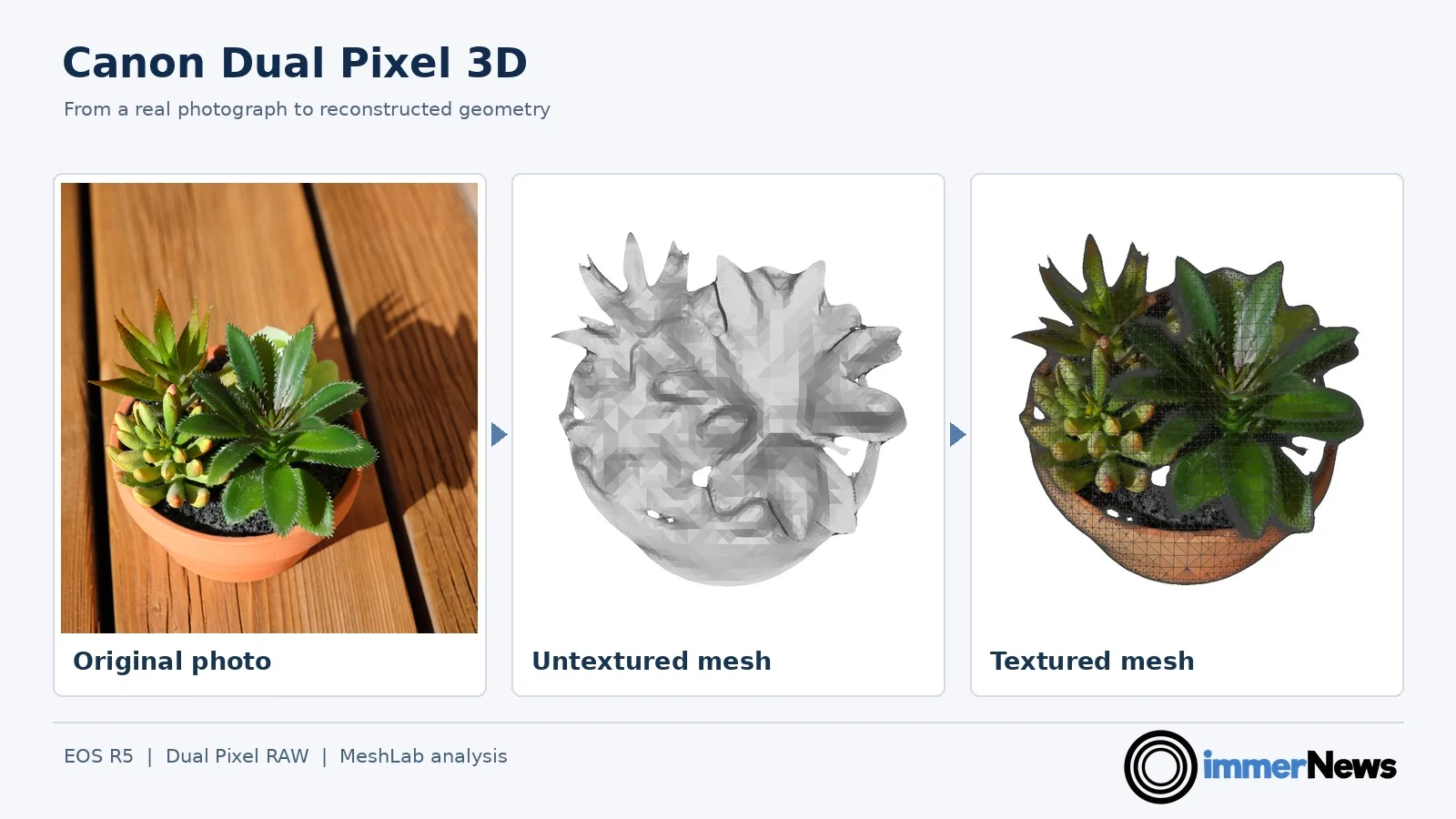

Intro
Canon released the free Dual Pixel 3D Converter 1.0.0.13 for Windows on October 8, 2026. It takes a single 2D input image and creates a textured 3D mesh. We tested the software ourselves using Canon EOS R5 photos provided by Vlad Rex.
I have been interested in photography for many years. My other background is computer graphics. During my Master’s in Computer Science I specialized in that field, followed by more than ten years working as a research scientist in computer graphics. Canon’s new Dual Pixel 3D Converter brings these two interests together: going from photos to textured 3D models that can be rendered and viewed from different angles.
For VR and 3D content creation, this is part of a broader trend. Photogrammetry works by using multiple photos. Gaussian splatting provides a new way to represent captured scenes. Newer 2D image-to-3D systems try to infer a model from one image. Canon takes a different approach by using phase-difference information captured by Dual Pixel cameras. We wanted to see both how convincing the results look and what the software actually exports.
How Canon Dual Pixel 3D works
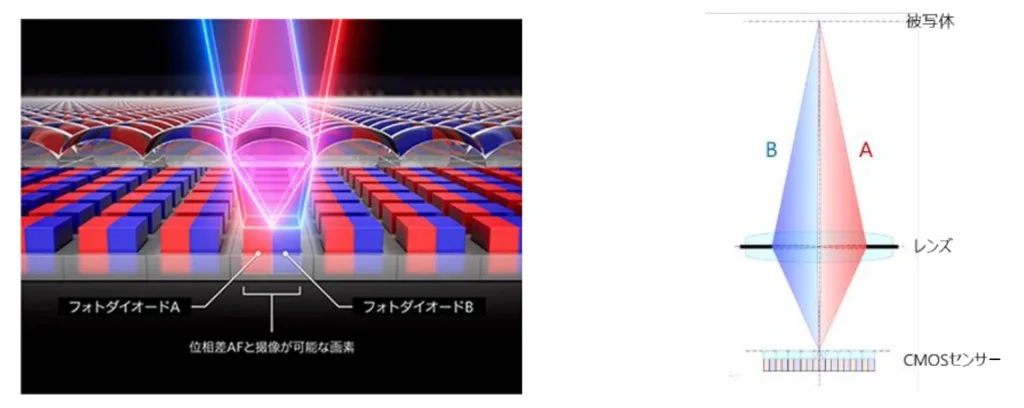
Canon’s Dual Pixel sensor has two photodiodes per pixel. Originally developed for phase-detection autofocus, Dual Pixel information has also supported functions such as Dual Pixel RAW adjustments and image-based focusing workflows. Here Canon uses the phase difference to infer 3D shape. The difference between their views through the lens provides phase information that the Dual Pixel 3D Converter uses to estimate shape and depth. The relatively small effective optical baseline makes close subjects a good target for this technology.
Canon lists compatible EOS R cameras and selected lenses. Our tests used Dual Pixel RAW (DPRAW). Canon also supports JPEGs containing distance information from the EOS R8 Mark II, but not ordinary EOS R5 JPEGs. In our EOS R5 tests, we always used Dual Pixel RAW .CR3 files as the Converter input, even when a matching JPG had been saved in the same folder. The Windows Converter exports OBJ or GLB models (more details on these formats later), and it can render an MP4 video preview. On Canon’s official application page, the gallery calls a full-scene reconstruction a “3D Photo”, but we did not find a direct side-by-side stereoscopic photo export in the tested interface.

Supported Canon cameras and lenses
Dual Pixel 3D Converter requires both a supported EOS R camera and a supported RF or RF-S lens. Canon currently lists eight camera bodies and twelve lenses. The EOS R5 Mark II requires firmware version 1.3.1 or later. Of these listed bodies, only the EOS R8 Mark II currently supports JPEG images with distance data; the others use compatible DPRAW captures. RF-S lenses trigger an APS-C crop on full-frame bodies such as the EOS R5. The official list is available on Canon’s Dual Pixel 3D compatibility page.
Compatible cameras
| Camera | Format | US price |
|---|---|---|
| EOS R5 Mark II | Full frame | $3,999 |
| EOS R5 | Full frame | $2,999 |
| EOS R6 Mark III | Full frame | $2,799 |
| EOS R6 Mark II | Full frame | $1,999 |
| EOS R7 | APS-C | $1,549 |
| EOS R8 Mark II | Full frame | $1,899 |
| EOS R8 | Full frame | $1,349 |
| EOS R10 | APS-C | $999 |
Compatible lenses
| Lens | Format | US price |
|---|---|---|
| RF24-70mm F2.8 L IS USM | RF | $2,399 |
| RF24-50mm F4.5-6.3 IS STM | RF | $349.99 |
| RF24-105mm F4 L IS USM | RF | $1,399 |
| RF24-105mm F4-7.1 IS STM | RF | $459.99 |
| RF35mm F1.8 MACRO IS STM | RF | $499.99 |
| RF50mm F1.8 STM | RF | $199.99 |
| RF70-200mm F2.8 L IS USM | RF | $2,799 |
| RF70-200mm F4 L IS USM | RF | $1,599 |
| RF85mm F2 MACRO IS STM | RF | $639.99 |
| RF100mm F2.8 L MACRO IS USM | RF | $1,349 |
| RF-S18-45mm F4.5-6.3 IS STM | RF-S | $349.99 |
| RF-S18-150mm F3.5-6.3 IS STM | RF-S | $569.99 |
Some listings show previous promotions or discontinued/unavailable stock statuses. Check the retailer for a current purchase price. US sales tax is not included.
Canon’s interactive examples
Canon’s online examples include the models named Ajillo and Wreath. We inspected the original GLB files behind the web viewer and mirrored these two assets for our interactive comparison. Drag either model to see how the surface responds to changes in viewpoint.
Ajillo
Wreath
Canon’s Ajillo and Wreath interactive GLB examples are mirrored on our server. Drag to explore the reconstructed depth. Courtesy of Canon.
Our EOS R5 test: background and depth settings
Vlad Rex kindly provided the photographs for our test. The potted-plant image was taken with a Canon EOS R5 and RF 50mm F1.8 STM lens at f/5, 1/640 s and ISO 125. We processed the Dual Pixel RAW ourselves in Canon Dual Pixel 3D Converter for Windows.
Canon Dual Pixel 3D Converter also displays a practical shooting warning in one of our conversions: for best results the f-number should be no higher than 5.6 and ISO should be 1600 or lower. We saw this warning when loading a photo taken at f/6.3 and ISO 125.
We created various 3D meshes and embedded them here. In the first sample at the top left, the full-scene version keeps the photographic background. The other versions remove the background and use the default depth value of 1, a reduced value of 0.5, or an increased value of 2. These models come from the same input photo.
Using the same EOS R5 photograph, we compared the triangle counts of exports with different background and depth settings:
| Background | Depth setting | Triangles | Result |
|---|---|---|---|
| Removed | 0 | ~16K | Completely flat |
| Removed | 0.5 | ~18K | Reduced depth |
| Removed | 1 | ~28K | Default depth |
| Removed | 2 | ~46K | Enhanced depth |
| Retained | 1 | ~58K | Full scene |
Even the depth 0 export retains thousands of triangles, despite being geometrically flat.
Full scene, depth 1
Background removed, depth 1
Background removed, depth 0.5
Background removed, depth 2
Interactive, exported meshes from R5 input images using DP3D. Textures reduced from 8192 × 5464 to 4096 × 2732 pixels for web display.
Input photographs courtesy of Vlad Rex.
Looking inside the geometry with MeshLab
OBJ is a long-established text-readable 3D mesh format, often accompanied by a separate material file and texture image. GLB is a binary form of glTF that can bundle mesh, materials and textures into one file, making it convenient for sharing and browser-based viewing.
We used the free, open-source MeshLab application and direct analysis of OBJ and GLB data to examine vertices, triangles, normals and UV texture coordinates. The OBJ and GLB exports represent the same geometry but store reusable vertex data differently:
| Export format | Triangles | Stored vertex entries | JPEG texture |
|---|---|---|---|
| OBJ + MTL | ~28K | ~15.8K | Separate file |
| GLB | ~28K | ~84.6K | Embedded |
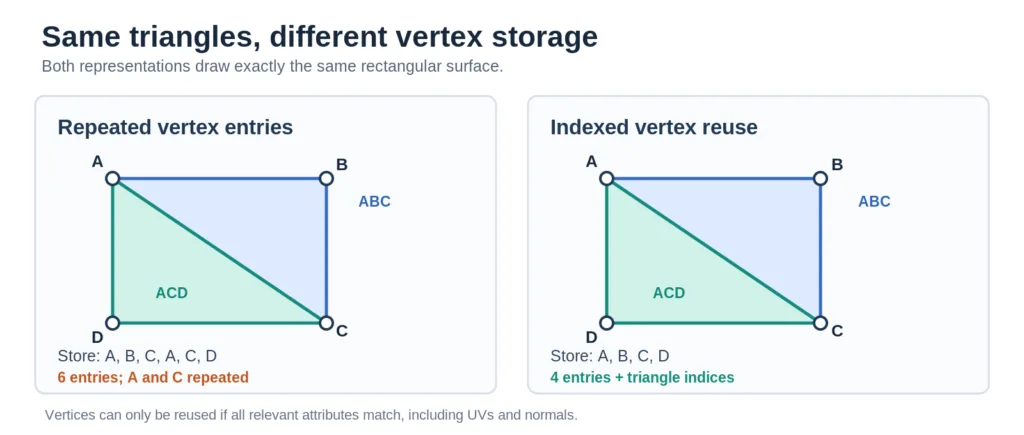
An indexed mesh can store shared vertices once and reference them from several triangles. Two triangles forming a rectangle need only four unique vertices if all attributes can be shared, rather than six repeated entries. The Canon GLB therefore has potential for more efficient indexing. We also found about 1.2K degenerate triangles, about 4.2% of the default mesh. These have zero or effectively zero area and are another potential cleanup opportunity.
We also inspected material sidedness in the original files from our EOS R5 export. The GLB’s textured material is single-sided because it does not set glTF’s optional doubleSided flag, which defaults to false. The matching OBJ and MTL files do not have a standardized equivalent to that glTF setting. Whether an OBJ appears visible from both sides therefore depends on the software and its rendering settings. In Canon’s separately inspected website examples, Wreath is also single-sided, while Ajillo is explicitly double-sided. This explains why Wreath largely disappears when viewed from behind while Ajillo remains visible. The Ajillo website GLB identifies a Blender exporter, while Wreath and our own exported GLBs identify Canon’s Converter, so different export paths may help explain these material settings.
Photographic textures and possible optimizations
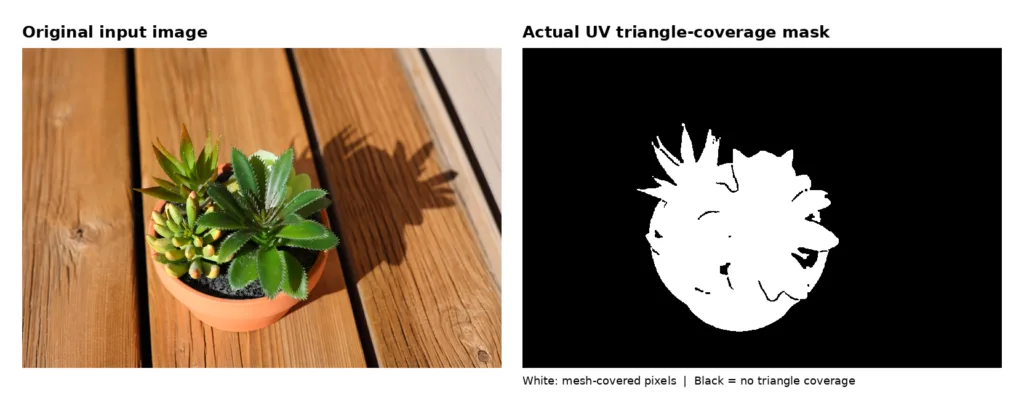
The EOS R5’s simultaneously saved JPG and the texture exported from our DPRAW conversion both measure 8192 × 5464 pixels. The Converter recompressed the image: in our test, the original JPG was about 12.81 MB and the exported texture about 3.33 MB, with very similar visual content. The isolated plant mesh covers only approximately 16.6% of the image area in UV space, but the entire photograph is still stored as the texture.
That suggests several useful future export options: lower-resolution textures, better reuse of mesh vertices, removal of degenerate triangles and possibly cropping the texture to a padded rectangle around the used UV region. A tight crop would require UV remapping and care with texture filtering. We did not benchmark such a crop; it is a suggestion based on the measured coverage.
For our interactive web examples, we simply reduced the textures to 4096 × 2732 pixels, one quarter of the original pixel count, while keeping the geometry and UV coordinates unchanged. Across our four plant exports, this reduced total GLB file sizes by approximately 22% to 41%.
What the Converter settings actually change
Replacing the surface texture with an unrelated cat photo left the original about 85K GLB vertex positions, triangle indices and UV coordinates unchanged. This means that the feature is used as texture substitution. Canon’s more typical use case is replacing the original image with an edited version of the same photo.
In contrast, changing the depth setting from 1 to 2 increased the isolated model from about 28K to about 46K triangles, approximately 62% more. The depth-coordinate extrema nearly doubled, but the changed topology and horizontal bounds show that it was not simply the same mesh stretched along one axis.
The Canon DP3D Converter also supports batch conversion, which is useful when processing multiple compatible photographs instead of exporting each one separately.
The Converter also has Preview Settings for backgrounds, foreground overlays and frames for the short video generation. Our exported MP4 is a four-second, 1080 × 1080, 30 fps H.264 video. It zooms toward the subject and then rotates slightly. We did not find a way to edit the camera path.
Canon’s built-in preview export video from our plant reconstruction. Four seconds, 1080 × 1080 pixels, 30 fps.
Where the reconstruction struggles
One flower reconstruction looked convincing from the original view, but rotating it revealed a long, sharply stretched piece of geometry. This is consistent with the difficulty of inferring hidden or occluded surfaces from a single photo.
Someone with experience in Blender or another mesh editor could probably remove or repair such a localized stretched region. That makes the model potentially useful even with imperfections, but ideally such cleanup would not be necessary.
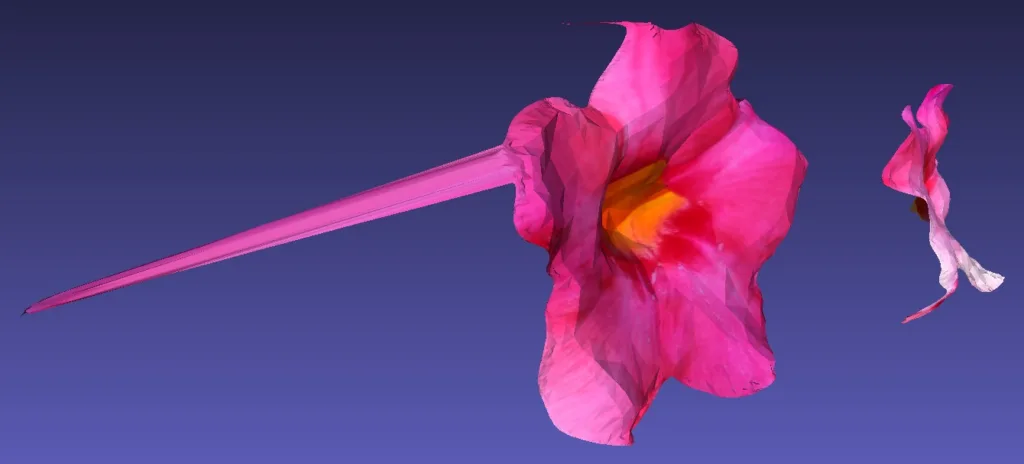
Flower reconstruction with a stretched region
Viewing the models stereoscopically in VR
For food, flowers, plants, small products and other subjects viewed from a modest range of angles, Canon’s method can produce a compelling result with photographic textures. Background removal worked well in our potted-plant test. The 3D models can also be rendered separately for each eye in VR, providing stereoscopic depth without exporting a fixed left/right photo pair.
After looking at roughly 20 to 30 additional sample models, my practical impression is that the strongest use case today is a subtle change of viewpoint, typically about 5 to 10 degrees to either side of the original view, mostly horizontally. At those angles, the models often provide a convincing 3D effect while keeping the photorealistic appearance. Larger rotations more readily expose stretched geometry, missing surfaces and limitations of a single-camera viewpoint.
Displaying a GLB on your own website
GLB files can be displayed interactively on websites using the free, open-source model-viewer component. You can host the 3D model and viewer files on your own web server and integrate the viewer into a website using HTML or an iframe. Visitors can then rotate and explore the model directly in their browser without installing additional software. This is also how we display the interactive examples in this article.
Canon Dual Pixel 3D and AI image-to-3D
We also submitted the same plant photograph to Meshy, an AI-powered 3D content creation platform. We used their AI model Meshy 7.1 in High Detail Mode with 4K texture generation and the Games category. The first export had approximately 1.6 million triangles, and the result forms a much more complete object that remains plausible as the camera rotates around it. However, in our example the texture looks less like the original photo than Canon’s reconstruction. That makes the AI result interesting for games and other asset-creation tasks, but not automatically better for photorealism.
We also tried Meshy’s Smart Topology feature with a target of 30,000 polygons. Its resulting GLB contains about 31K triangles, a major reduction compared with the original High Detail export.
Meshy’s paid workflows can accept multiple input images. Canon’s current Dual Pixel 3D Converter does not combine multiple photographs of the same subject. An optional future multi-image mode, possibly combined with AI-assisted completion of hidden areas, would be particularly interesting. It could bring Canon’s approach closer to photogrammetry while benefiting from the high quality of existing EOS cameras and RF lenses.
This Meshy example uses a reduced Smart Topology mesh. It is an AI-generated model based on our single input photograph, not a Canon DP3D export.
Downloads
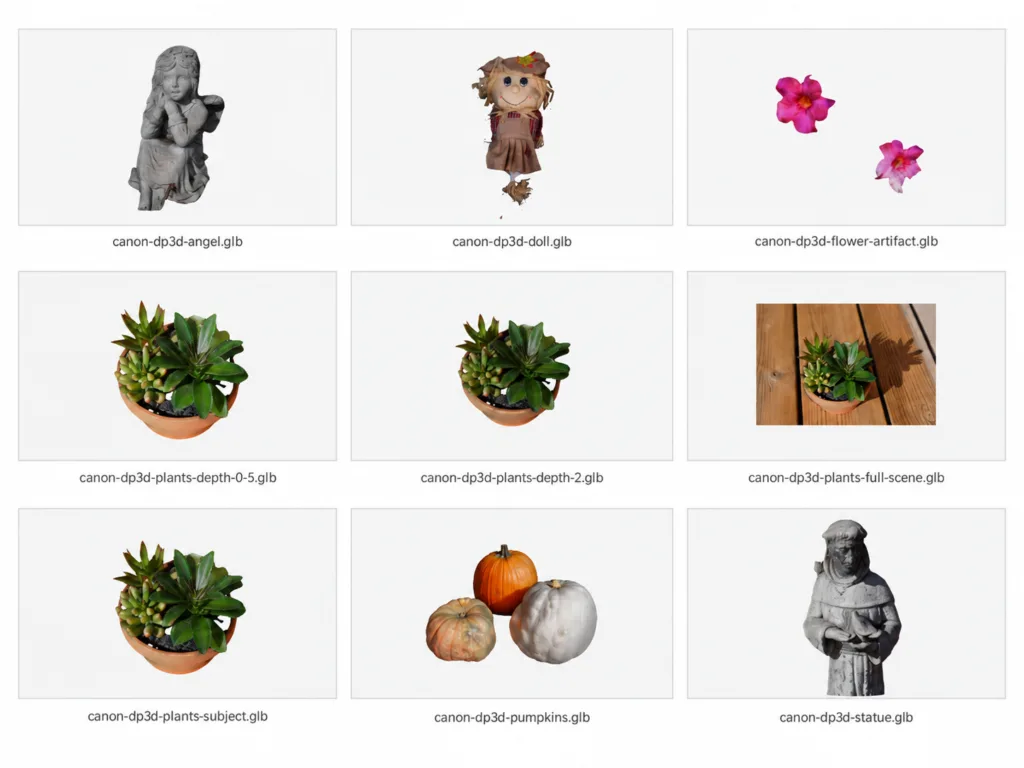
To best judge the exported 3D meshes with textures yourself, we share a download with nine of our own .glb model files (28 MB) with you that were created with the Canon DP3D tool.
Conclusion
Canon Dual Pixel 3D is an impressive first step toward making 3D creation accessible to photographers with supported cameras and lenses. Its strength is the realistic appearance of the surfaces actually seen by the camera. Its weaknesses are incomplete unseen geometry, occasional stretched artifacts, and exports that could be more compact.
My highest wish for a future version is multi-image input. Additional photographs could provide evidence for surfaces that a single shot cannot see, and Canon already has an extensive range of high-quality camera bodies and lenses designed for detailed, low-noise photography. That could become a compelling foundation for more complete 3D capture. Smaller optional textures, better mesh indexing and improved handling of depth discontinuities would also be welcome.
How would you creatively use this technology for your workflow and sharing with friends? Let us know in the comments.
So here we go. We got a quick and easy to use system to create mesh models of some real-life objects. It’s an unexpected and pleasant surprise, because it practically popped-up out of nowhere. Yes, the working prototype concepts of it were shown during last two CES trade shows, but there were no any hints about it being widely released as an official photo application. And the sweet part is that it’s available for free. Of course the whole system will cost you nothing if you already own supported camera body and approved lens. But if you are missing that particular camera equipment, then it’s better if you thing longer before getting into it.
I already own R5 camera body, but I was missing an approved RF optics. Getting a used 50mm prime lens for an affordable price seemed like a acceptable cost for trying this new Dual-Pixel-to-3D image manipulation (Canon calls it “Dual Pixel 3D Coverter”, or DP3D in short). Well, in reality, it’s only a 2.5D converter, if you are familiar with CNC machining, but hey, still better than boring flat 2D stuff 🙂
I downloaded DP3D app as soon as it was made available (directly from Canon Japan web page, while Canon Australia and Canon USA were still showing it as “Coming soon”) … yes, I was really curious to see what it can do ASAP. I installed it on my cheapo Win11 laptop with only i5 Intel processor. Despite minimum i7 core recommendation, that app still works well on i5.
To test this new feature, I went for a short walk and took over 100 photos. I followed all camera setting and photo framing recommendations that Canon publishes few days earlier. Despite that, when selected in DP3D file menu, almost all photos showed yellow “!” warning icons and one photograph was causing an instant DP3D app crash, as soon as DP3D reached it during initial file folder parsing (it took me a while to find and remove that particular CR3 file). Out of those test images, there were four of them that failed to export their mesh models, even though there were no red “X” error icons on them. You can export a 3D model for a single photo at a time, or for multiple images, as well as for all of them shown in the left app panel (by simply selecting them all with the good old CTRL-A shortcut). Little hint … be patient when exporting a single image model for the first time … the progress bar in the conversion pop-up window doesn’t move at all for over a minute, despite it doing its job correctly. It gave me the impression that the app froze and I was killing that conversion task prematurely several times in my attempts to get it working.
An then came viewing those exported mesh models. The overall experience is a bit underwhelming. Out of those 100+ photos, only about 25 of them produced good looking 2.5D rotating results. Interesting thing is that some of them looked interesting with background export included, while looked incomplete when exported without background. Some other of those few photos gave a reversed impression: looked tidy and engaging during <+/-10 degrees look-around rotation without background, while were a mess with background included. So it's a good idea to try both exports for each conversion.
My conclusion about this new feature is that it's quite finicky. Sometimes it gives nice results, some other times the output is not really useful. It's a hit or miss, and it's difficult to predict while you take the original photo. The best success is with single objects with shallow depth, when they are recorded in straight-on direction. That includes portraits of human faces (when they look straight into camera). Half profiles can also be recorded, e.g. for developing mesh models for CNC "carving" or 3D printing, but during viewing they instantly fall apart behind nose hidden areas when rotated.