

Introduction
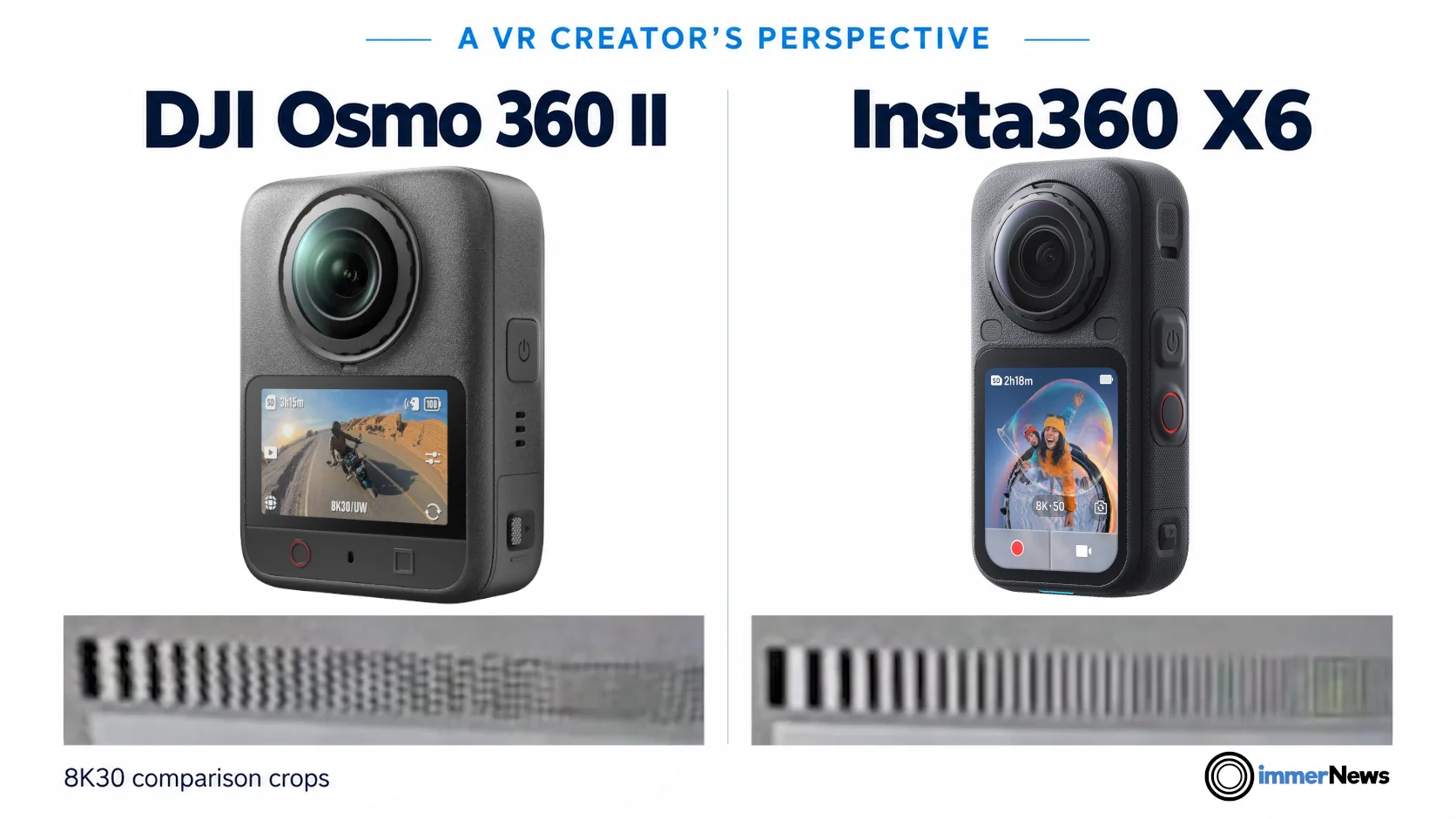
The market for cameras that capture monoscopic 360° content is pretty active. A common use is to capture action footage and later reframe the most interesting parts as conventional 2D video. For VR, these cameras offer another use: a full spherical view that lets viewers look in any direction. In this article, we compare the latest dedicated 360° cameras from DJI and Insta360, discuss what their specifications mean for VR playback, and examine image quality using Naoto Somese’s footage from PRONEWS.
DJI Osmo 360 II: New camera release
On September 3rd, 2026, DJI announced its new camera: DJI Osmo 360 II*. It competes directly with the recently released Insta360 X6*. The table below compares the relevant specs of both cameras.
| 360° capture feature | DJI Osmo 360 II | Insta360 X6 |
| Sensor format | Two 1/1.1-inch-type square sensors | Two 1/1.1-inch-type square sensors |
| Lens aperture | f/1.9 | f/2.0 |
| Maximum 360° still output | 120 MP, 15520 × 7760 | 120 MP, 15520 × 7760 |
| Still formats | JPEG and RAW | INSP, JPEG, DNG |
| Maximum regular 360° video | 7680 × 3840 at 60 fps | 7680 × 3840 at 50 fps |
| Dedicated low-light 360° mode | AI SuperNight 2.0, up to 8K60 | PureVideo, up to 8K30 |
| 360° timelapse capture resolution | 16K | 16K |
| 360° timelapse export resolution | 8K at 30 fps via DJI Studio | 16K at 30 fps via Insta360 Studio |
| Color depth and log | 10-bit; D-Log M available | 10-bit; I-Log available |
| HDR information | HDR imaging and HDR stills advertised; up to 14.5 stops claimed | Native Dolby Vision advertised; up to 14.5 stops claimed |
| Maximum regular 360° video bitrate | 220 Mbps | 180 Mbps |
| Maximum 16K timelapse bitrate | 600 Mbps | Unconfirmed for 16K timelapse 240 Mbps for 8K timelapse |
| Original 360° video format | .osv, H.265 | .insv, H.265 |
| Usable internal storage | 105 GB, plus microSD | 47 GB, plus microSD |
| Lens replacement | User-replaceable outer lenses | User-replaceable outer lenses |
| Weight | 183 g | 196 g |
| Price (September 2026) | 589 € | 699 € |
Frame rates and headset playback
The two cameras have many features in common. For VR creators, the standout difference is that the DJI Osmo 360 II records 8K 360° video at 60 fps, compared with 50 fps for the X6. This may seem like a small gap, but it can have a significant impact on playback in VR. When playing back a video, it is ideal if the display refresh rate matches the video frame rate or an integer multiple of it. With a 60 Hz display mode, a 60 fps video could be displayed smoothly matching the refresh of the display. In virtual reality headsets, 60 Hz leads to flickering and more latency. I would not recommend using a 60 Hz display frequency mode in VR, despite one headset in the table below allowing it. Interestingly, many headsets allow a 120 Hz mode. That way, a frame of a 60 fps video can be shown for two display refreshes, again nicely matching with each video frame displayed for the same amount of time. Therefore, the 60 fps capturing feature can have a significant impact on choosing which of these two cameras to purchase for a 360° VR video content creator. It should be mentioned that some VR headsets offer a very flexible refresh rate selection and do have a 100 Hz mode as well. For example, Meta just updated Quest 3 (but not 3S) to be able to freely choose any refresh rate from 72 to 207 Hz. However, support for a particular display refresh rate does not guarantee that every video player will use it. Starting with version 1.4.5, our VR media player app immerGallery uses this feature on Quest 3. For example, it plays 50 fps video at a 100 Hz refresh rate and 60 fps video at 120 Hz. Here is an overview of various popular headsets with their documented refresh rates and whether they support an even cadence for 50 or 60 fps videos.
| Headset | Release date / status date | Documented refresh rates | Even cadence 50 fps? | Even cadence 60 fps? |
| Meta Quest 3 | 10/2023 | 72 to 207 Hz | Yes: 100/150/200 Hz | Yes: 120/180 Hz |
| PICO 4 Ultra | 09/2024 | 90 Hz | No | No |
| Apple Vision Pro, M2 | 02/2024 | 90, 96, 100 Hz | Yes: 100 Hz | No |
| Apple Vision Pro, M5 | 10/2025 | 90, 96, 100, 120 Hz | Yes: 100 Hz | Yes: 120 Hz |
| Samsung Galaxy XR | 10/2025 | 60, 72, 90 Hz | No | Yes: 60 Hz |
| Play For Dream MR | 02/2025 | 90 Hz | No | No |
| HTC VIVE Pro 2 | 06/2021 | 90, 120 Hz | No | Yes: 120 Hz |
| Bigscreen Beyond 2 | 06/2025 | 75, 90 Hz | No | No |
| Pimax Crystal Light | 05/2024 | 72, 90, 120 Hz | No | Yes: 120 Hz |
| Pimax Crystal Super, QLED | 04/2025 | 72, 90 Hz | No | No |
| Valve Steam Frame | Soon™ | 72, 120 (?), 144 Hz | Not confirmed | Not confirmed |
| PICO Space Pro | Upcoming: Q4/2026 | ? | ? | ? |
As the table shows, fewer headsets support 100 Hz than support 60 or 120 Hz. This makes 60 fps generally the better choice when sharing content with others. Several headsets still cannot display 60 fps video with an even cadence. Does this mean that all 60 fps videos appear to stutter in VR? No, not in my experience. 60 fps is already a high frame rate and even watching it on a display running at 90 Hz is something I personally perceive as smooth and I cannot notice if frames are displayed for different durations. However, as with many aspects of VR, immersion and stereoscopy, this depends on the perception of the individual: some are more sensitive than others to these effects. So it is worthwhile for content creators to consider the options for frame rates on VR cameras.
What about 90 fps?
A quick shoutout also to Apple Immersive Video, which already brings 90 fps to high-resolution immersive viewing on Vision Pro. Its production workflow includes 8K capture per eye at 90 fps with the professional Blackmagic URSA Cine Immersive camera. With Apple backing 90 fps for immersive media, it would be welcome to see consumer 360° cameras offer an 8K90 mode alongside the more familiar 30, 60 and 120 fps options. This could match the 90 Hz display mode available on many VR headsets, provided their video decoders can handle that resolution and frame rate.
Low-light modes
The difference between the cameras is even greater in their low-light modes: at 8K, the DJI Osmo 360 II offers 60 fps compared with 30 fps for the X6. Although 30 fps video can be displayed with an even cadence at 60, 90 or 120 Hz, I personally find it insufficiently smooth for dynamic scenes in VR. For full spherical VR viewing, I also consider resolutions below 8K too low, so we are not covering the higher frame rates these cameras offer at lower resolutions.
Timelapse
Both cameras offer a 360° timelapse mode, capturing high-resolution images at intervals and saving them as video. The manufacturers’ conversion tools can then export a full spherical video showing the scene at an accelerated pace. Both support timelapse export at 30 fps. Since timelapse already compresses time, creators can also reinterpret the footage at 60 fps in a video editor, playing each recorded frame once and doubling the playback speed.
The X6 has the advantage of exporting to a resolution of 16K while DJI allows only an 8K video export. While a 16K export option is more future proof, it shall be noted that for viewing in VR, current Android-based headsets such as Meta Quest 3 / 3S, PICO 4 Ultra and Samsung Galaxy XR as well as the hardware decoders in NVIDIA GeForce RTX 50 series graphics cards are limited to a maximum of 8K playback. Given these playback limits, the difference may matter less to creators who mainly shoot regular video.
Image quality
Image quality may matter even more. For this, we turn to Naoto Somese’s detailed review for the Japanese site PRONEWS. In his daylight comparison video of DJI Osmo 360 II vs. Insta360 X6, he holds a test chart in front of both cameras, allowing us to compare fine detail and color reproduction in their 8K30 footage.
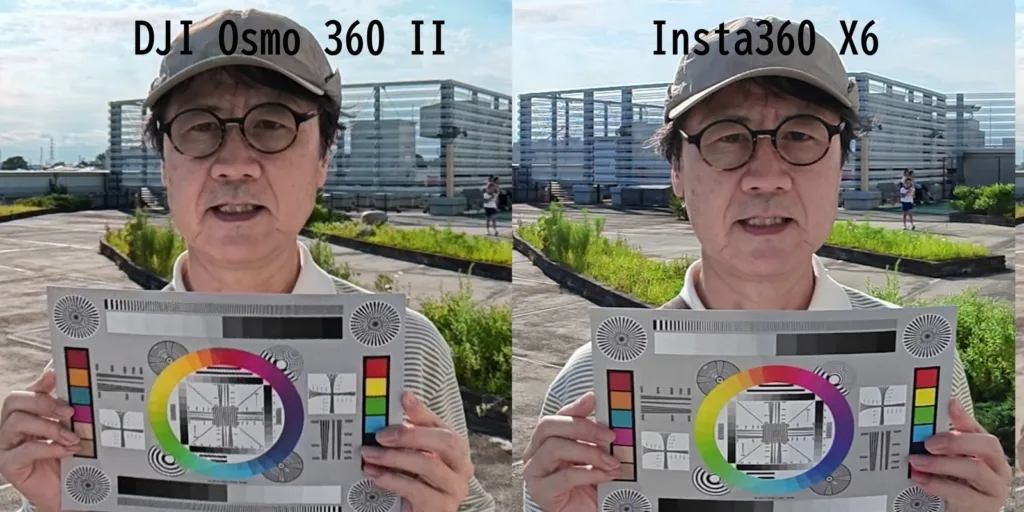
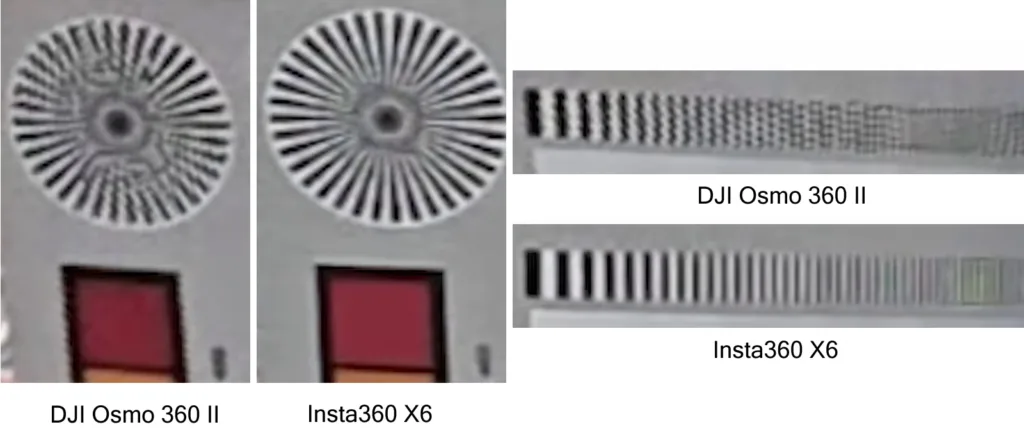
The close-up comparison from the 8K 360° video mode shows more fine detail in the Insta360 X6 footage. It does reveal that the DJI footage in this comparison shows visible jagged artifacts. Lines that are shown cleanly on Insta360 X6 are showing irregular patterns with pixel samples spiking in and out of the line. We previously observed similar artifacts on the Slam Xcam VR180 camera across roughly half of its image area. To the best of our knowledge, this was never fixed in the Slam Xcam.
These artifacts could originate at several stages of the imaging process. A possibility is that sampling during the conversion from fisheye to equirectangular projection or exporting could cause such a problem. If it does happen in post-processing and is absent from the original recording, this might be something that DJI can fix in a future firmware update or an updated release of their DJI Studio software.
We currently do not have comparisons of the 120 MP still photos between these cameras.
Conclusion
The DJI Osmo 360 II and Insta360 X6 have similar specs in many areas. At their maximum 360° video resolution, DJI offers 60 fps compared with 50 fps for the X6. Based on the image quality sample above, our current recommendation for creators of monoscopic 360° video is the Insta360 X6, despite its less desirable 50 fps ceiling at 8K. If a future firmware or DJI Studio update addresses the image quality issue and brings DJI’s output on par with the X6, the DJI camera could become the more attractive choice. If we hear about such updates, we will report on them here at immerNews.
What do you think? How much does the difference between 50 and 60 fps matter to you, and how do you weigh it against image quality? Feel free to discuss it in the comments.
Links
- DJI Osmo 360 II review on Japanese site of PRONEWS from Naoto Somese (use auto-translate in browser)
- DJI Osmo 360 II*
- Insta360 X6*
* Affiliate link: If you purchase through this link, we may receive a commission. This does not influence our editorial coverage.
2026-09-13: Updated Insta360 X6 max video bit rate as posted by Insta360 support. Many thanks to Reddit user cheloutevr for the correction!
It’s a quite close contest between those two cameras.
At the first glance, the video quality from X6 may look a bit better, but several owners of this cam reported that it’s over-processed by its internal dedicated AI-processing chips (with one user even complaining that he doesn’t want to watch videos with his kids having 6 fingers). In contrast, the fine detail reproduction on Osmo360 II cam may look messier, but at least it’s not artificially invented.
This analysis is based on frame grabs from the video files. Video compression algorithms in general sacrifice resolution, especially in lower bit rate recordings. So it’s difficult to see what is the real resolving power of those cameras. It’ll be interesting to see how those 120MP photo files look like (although Mr. Siyang, the prolific modder of 360 cams into VR180 config, reported that still images from those two recent cameras are not any better than taken by Qoocam 3 Ultra camera). Hopefully we will see more samples from all those cameras to compare.