
Intro
Virtual reality headsets and VR glasses might be the best way to consume stereoscopic content. The optical separation of the left-eye and right-eye views avoids the left/right crosstalk that can occur with shutter glasses or polarized glasses when watching a 3D TV or a film in a 3D cinema.
For people collecting their own 3D video content, the question is often which format is best suited to storing such stereoscopic content, considering the tradeoffs between image quality, file size and playback support.
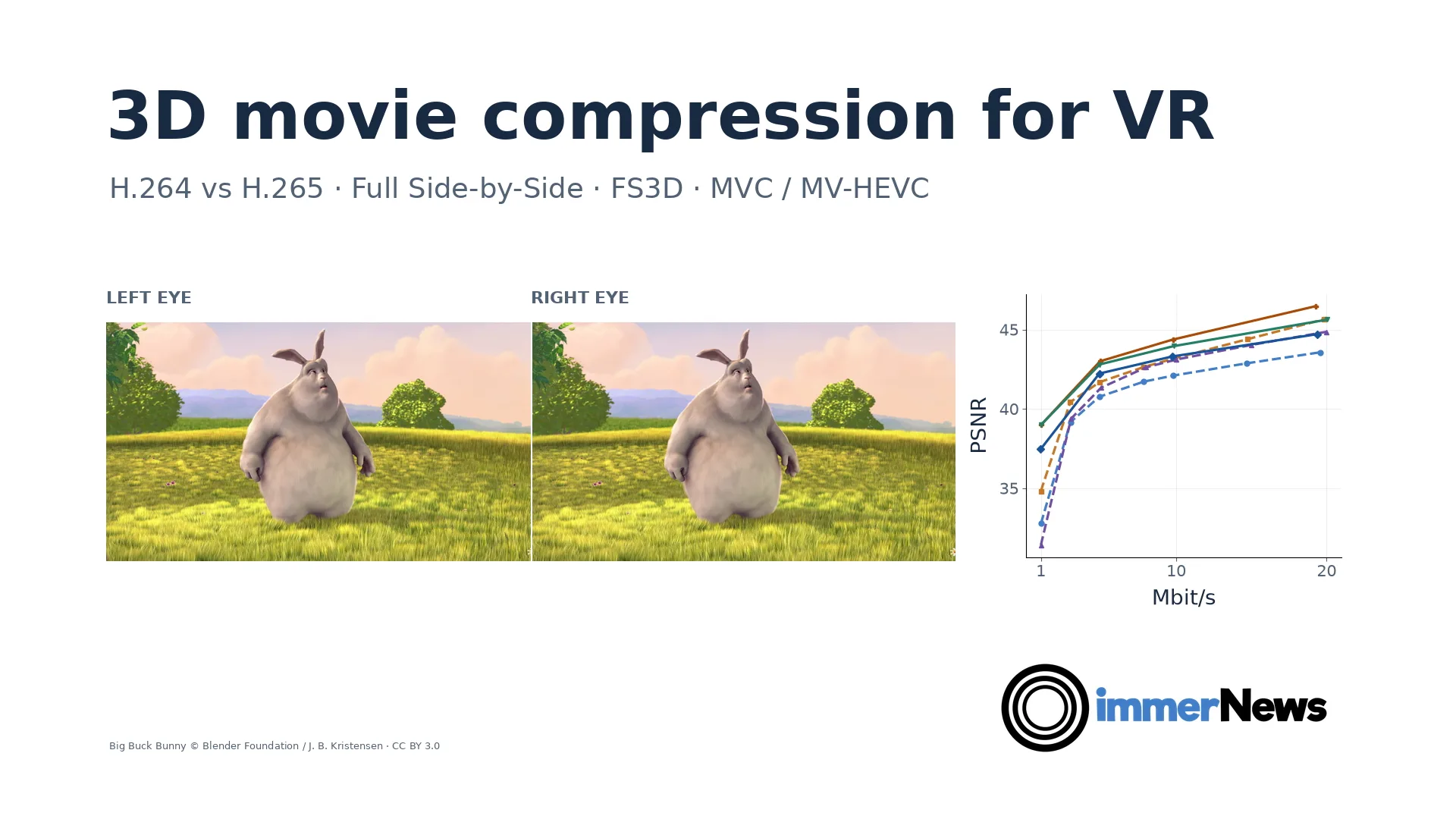
In this article, we analyze different compression options with recent toolchains. In one case, support for writing frame-sequential 3D metadata in the H.265 encoder x265 was added only shortly before our tests. This gives us an up-to-date comparison of the different techniques. We ran the encodes, measured their quality and evaluated the image comparisons ourselves. We compare full side-by-side 3D storage, frame-sequential 3D (FS3D) and multiview coding in both H.264 (AVC) and H.265 (HEVC). As input references, we use the original Big Buck Bunny stereo PNGs and direct backups of MVC Blu-ray discs.
Disclosure: immerGallery is developed by the same immerVR team behind immerNews.
Full SBS, FS3D and multiview explained
There are different ways to store stereoscopic content with a separate image for the left and right eyes.
- In full side-by-side (SBS) mode, the two images are placed next to each other, often with the left-eye image on the left side and the right-eye image on the right side. For storage, this can also be done the other way around, or the views can be arranged in a full top-bottom layout, as long as the playback software is aware of it and displays them correctly. In the example of a 3D movie from a Blu-ray 3D disc, one image for one eye has 1920 × 1080 pixels. The combined full SBS image is 3840 × 1080 pixels. With an example frame rate of 24 fps, there are 24 images with 3840 × 1080 pixels per second.
- Frame-sequential 3D (FS3D) uses another method: instead of merging the views, it alternates the full eye pictures in presentation order. In a left-first stream, the left-eye picture is followed by the right-eye picture from the same moment, then the left-eye picture of the next stereo pair, and so on. Right-first streams are also possible. This means there are twice as many pictures per second in the file. Our example with 24 stereo pairs per second becomes a video with 48 pictures of 1920 × 1080 pixels per second. Each eye still receives 24 motion samples per second. The video player pairs the pictures for stereoscopic presentation.
- Another approach is to make use of multiview coding: views captured at the same moment show the scene from different perspectives, so there are similarities, often involving a shift in perspective and differences that can be encoded. In the most common case, we have two views for our left and right eyes. However, a multiview display could use more, such as 16 views for a horizontal autostereoscopic display or 16 × 16 views for a light-field display. In this article, we stay with the common stereoscopic case with two views. Knowing the left-eye view, the base view in this example, the decoder can reconstruct the second, dependent view using the additional coded information. Either eye can be the base view. A compatible decoder without multiview support can decode that base view alone, for example for a 2D display, with 1920 × 1080 pixels at 24 frames per second. A multiview decoder can decode both views with 1920 × 1080 pixels at 24 frames per second. Well-known codecs for this are H.264 MVC (Multiview Video Coding), used in Blu-ray 3D, and H.265 MV-HEVC (Multiview High Efficiency Video Coding), used in spatial videos from compatible iPhones and Samsung Galaxy S25 and S26 models with 3D capture enabled.
- For encoding, it is important to know that when video encoders store differences and use motion prediction between pictures, prediction does not need to be limited to consecutive pictures. In the case of FS3D, an encoder can look two pictures back to the same eye view, or use the neighboring picture from the other eye if that is a better reference. For full SBS, motion prediction mainly follows each view independently, usually without explicitly exploiting the similarities between the left and right halves. The multiview approaches keep their independent base view, which can be decoded without the other eye’s view, an advantage for efficient 2D fallback. FS3D can use references from either view, which can help compression. However, even for 2D playback it generally requires pictures from both views to be decoded, because the retained eye view can depend on the other one.
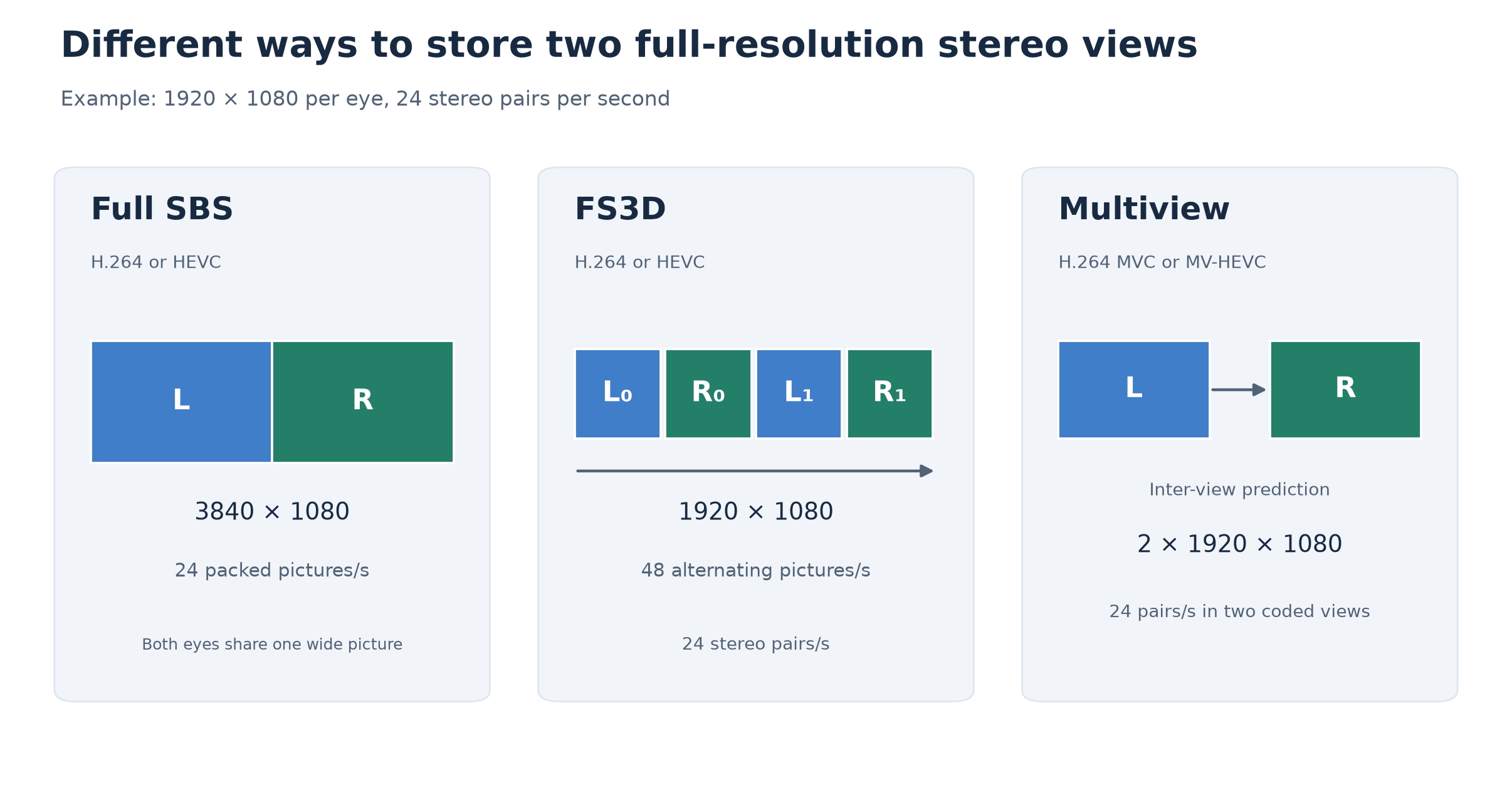
Center: FS3D alternates complete eye pictures. At 24 stereo pairs/s, FS3D contains 48 pictures/s.
Right: MVC and MV-HEVC code separate views and support prediction between them.
| Format | Storage for two 1080p eye views | At 24 stereo pairs/s |
|---|---|---|
| H.264 full SBS | One 3840 × 1080 H.264 picture | 24 packed pictures/s |
| H.264 FS3D | Alternating 1920 × 1080 H.264 pictures | 48 pictures/s |
| H.264 MVC | Two 1920 × 1080 MVC views | 24 pairs/s |
| H.265 full SBS | One 3840 × 1080 H.265 picture | 24 packed pictures/s |
| H.265 FS3D | Alternating 1920 × 1080 H.265 pictures | 48 pictures/s |
| H.265 MV-HEVC | Two 1920 × 1080 MV-HEVC views | 24 pairs/s |
Sources and comparison method
For a comparison with practically relevant content, we first look at Big Buck Bunny and later at two Blu-ray 3D movies as input sources for our compression tests.
The Big Buck Bunny (BBB) animated film was a 2008 project by the Blender Foundation. It was released under the Creative Commons Attribution 3.0 license, which makes it a useful source for experiments that can be shared publicly with attribution. In 2013, Janus B. Kristensen released a re-render with higher resolution and stereoscopic views.
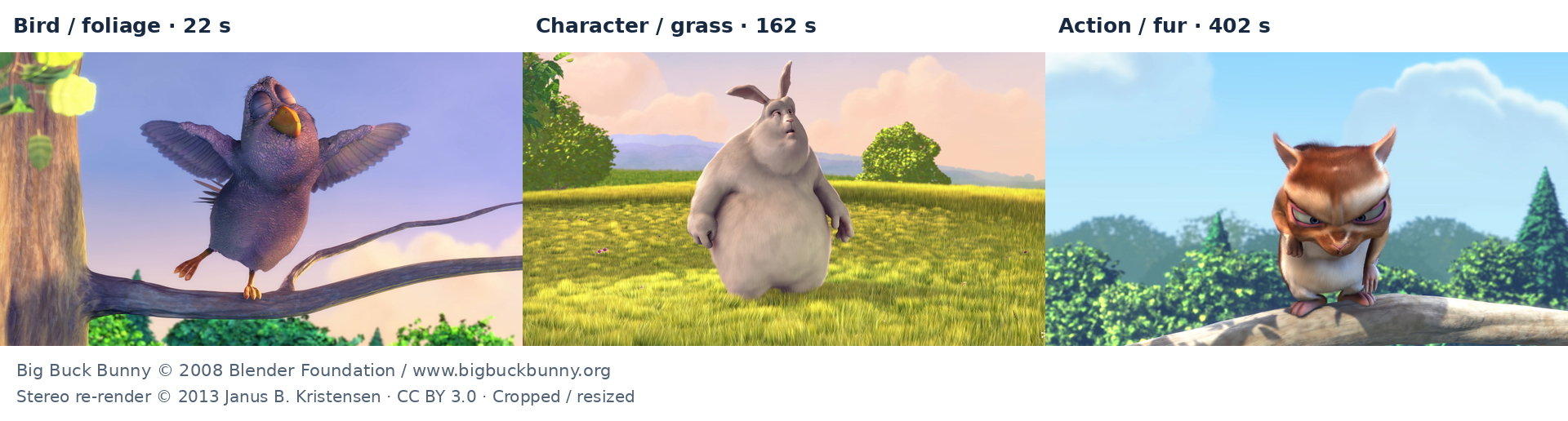
If encoding tests begin with an already lossily compressed input, it might not show the full detail and effect of the newly applied compression. Therefore, we are using the original Big Buck Bunny stereo PNGs as the animation reference. These are losslessly compressed top-bottom stereo image files with a resolution of 4000 × 4500 pixels (4000 × 2250 pixels per eye), from the 60 fps re-render. We selected every second source frame for 30 stereo pairs per second and resampled the images to 1920 × 1080 pixels per eye to match the more common resolution known from Blu-ray 3D. Our encodes are the first lossy video compression applied to these prepared reference pictures. We chose three representative scenes to analyze: a detailed bird with foliage, which we will examine later in a close-up; a scene with a character and detailed grass; and lastly, an action scene with a furry character.
The later Blu-ray 3D samples use the original H.264 MVC video as input. From each of the movies “Edge of Tomorrow” and “Terminator Genisys”, we use three six-second selections. They have 1920 × 1080 pixels per eye at about 24 frames per second. Here, the reference is the decoded Blu-ray video, so we measure the additional loss from re-encoding it.
For Big Buck Bunny, we use target bitrates of 1, 3, 5 and 10 Mbit/s for the combined stereoscopic video stream. For both “Edge of Tomorrow” and “Terminator Genisys”, all six workflows use the same targets: 1, 3, 5, 8, 10, 15 and 20 Mbit/s.
To evaluate the image quality after encoding and decoding, compared with the reference image, we use two common methods:
- PSNR (Peak Signal-to-Noise Ratio): The image being evaluated is compared pixel by pixel with the reference. The differences are squared and averaged to give the mean squared error. PSNR expresses the ratio of the squared maximum pixel value to that error on a logarithmic scale in decibels (dB). Higher PSNR values are better and mean less reconstruction error. An increase of 3 dB means approximately half the mean squared error.
- SSIM (Structural Similarity Index): While PSNR focuses on pixel-value errors, SSIM was designed to be closer to what is relevant for human perception: local brightness, contrast and structure are compared. Higher values are better. A score close to 1 indicates high similarity to the reference image.
Where the video has letterbox bars, we excluded them from scoring. Our reported PSNR-Y and SSIM-Y scores measure luma, the brightness component, across both eye views. Below is an overview of the video-only file size for a two-hour movie. Audio, subtitles and container overhead increase the file size in addition to this.
| Total video bitrate | Video-only size for two hours |
|---|---|
| 1 Mbit/s | 0.9 GB |
| 3 Mbit/s | 2.7 GB |
| 5 Mbit/s | 4.5 GB |
| 8 Mbit/s | 7.2 GB |
| 10 Mbit/s | 9 GB |
| 15 Mbit/s | 13.5 GB |
| 20 Mbit/s | 18 GB |
PSNR and SSIM results for Big Buck Bunny encoding
The graphs below show the PSNR and SSIM results for the Big Buck Bunny (BBB) examples, comparing the newly encoded and decoded images with the prepared reference images from the losslessly compressed PNGs. In the figures, HEVC means H.265, and MVC means H.264 MVC.
Across the tested bitrates from 1 to 10 Mbit/s, these measurements mostly show the following order, with the highest-scoring workflow first. There are two PSNR exceptions: MV-HEVC leads at 1 Mbit/s, and H.265 full SBS slightly exceeds MV-HEVC at 10 Mbit/s. The SSIM order is unchanged at all four tested rates. This ranks the tested encoder settings in this practical test for each format:
- Usually highest-scoring in our BBB test: H.265 FS3D
- H.265 MV-HEVC
- H.265 full SBS
- H.264 FS3D
- H.264 full SBS
- Lowest-scoring in our BBB test: H.264 MVC
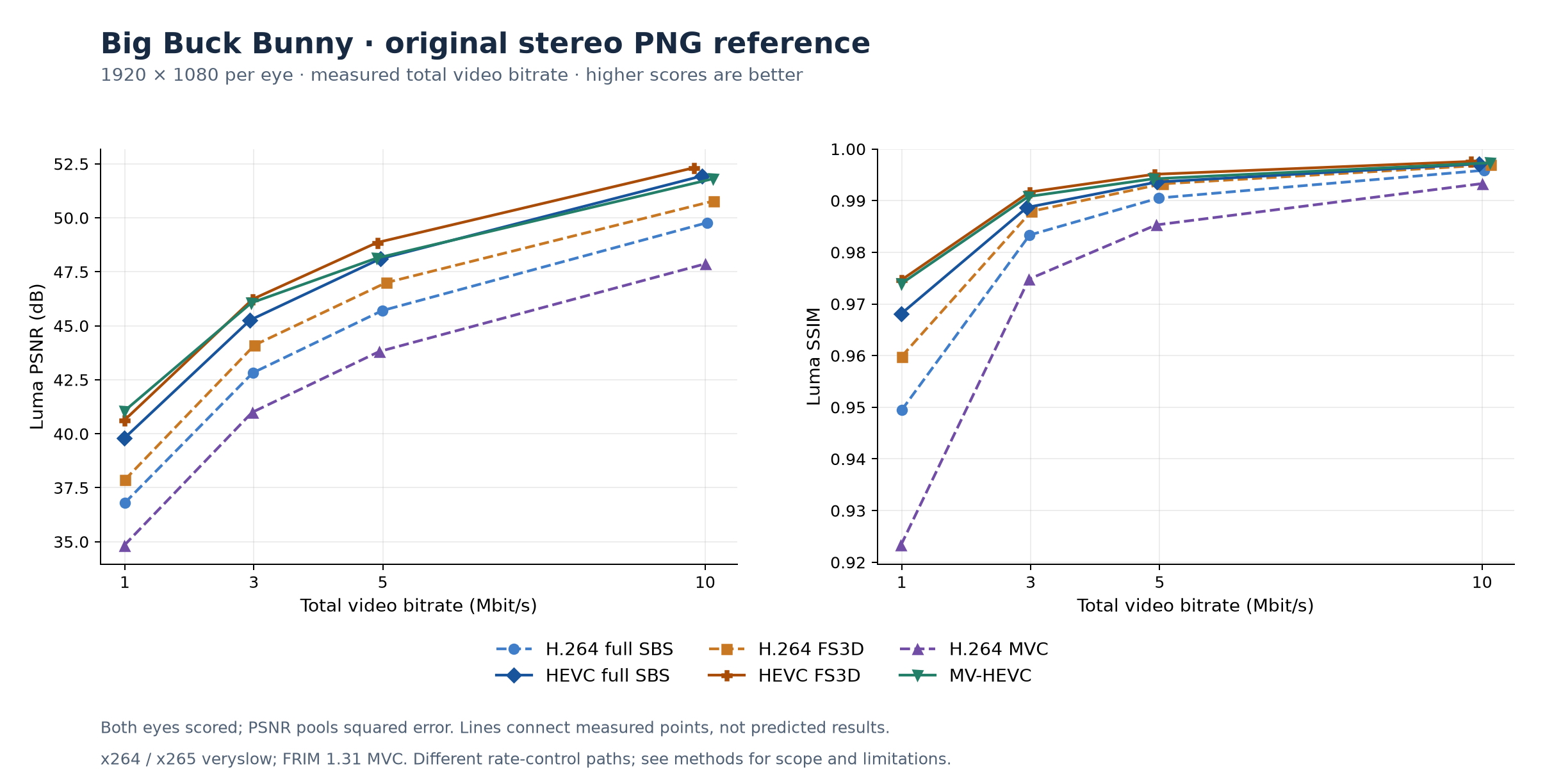
The results in the graphs are pooled from the three test scenes. However, the pooled result does not predict the values for every scene. Looking at the character/grass scene at the 5 Mbit/s target, we noticed that H.265 full SBS scored better in PSNR than H.265 FS3D. Their SSIM scores were almost identical, with a difference of only -0.0001 for FS3D minus full SBS.
| BBB selection | H.265 SBS PSNR-Y (dB) | H.265 FS3D PSNR-Y (dB) | FS3D − SBS (dB) | SSIM-Y change |
|---|---|---|---|---|
| Bird / foliage | 47.7 | 49.6 | +1.9 | +0.0022 |
| Character / grass | 48.7 | 47.6 | -1.1 | -0.0001 |
| Action / fur | 47.9 | 49.7 | +1.8 | +0.0023 |
Subjectively comparing detail in the left-eye view
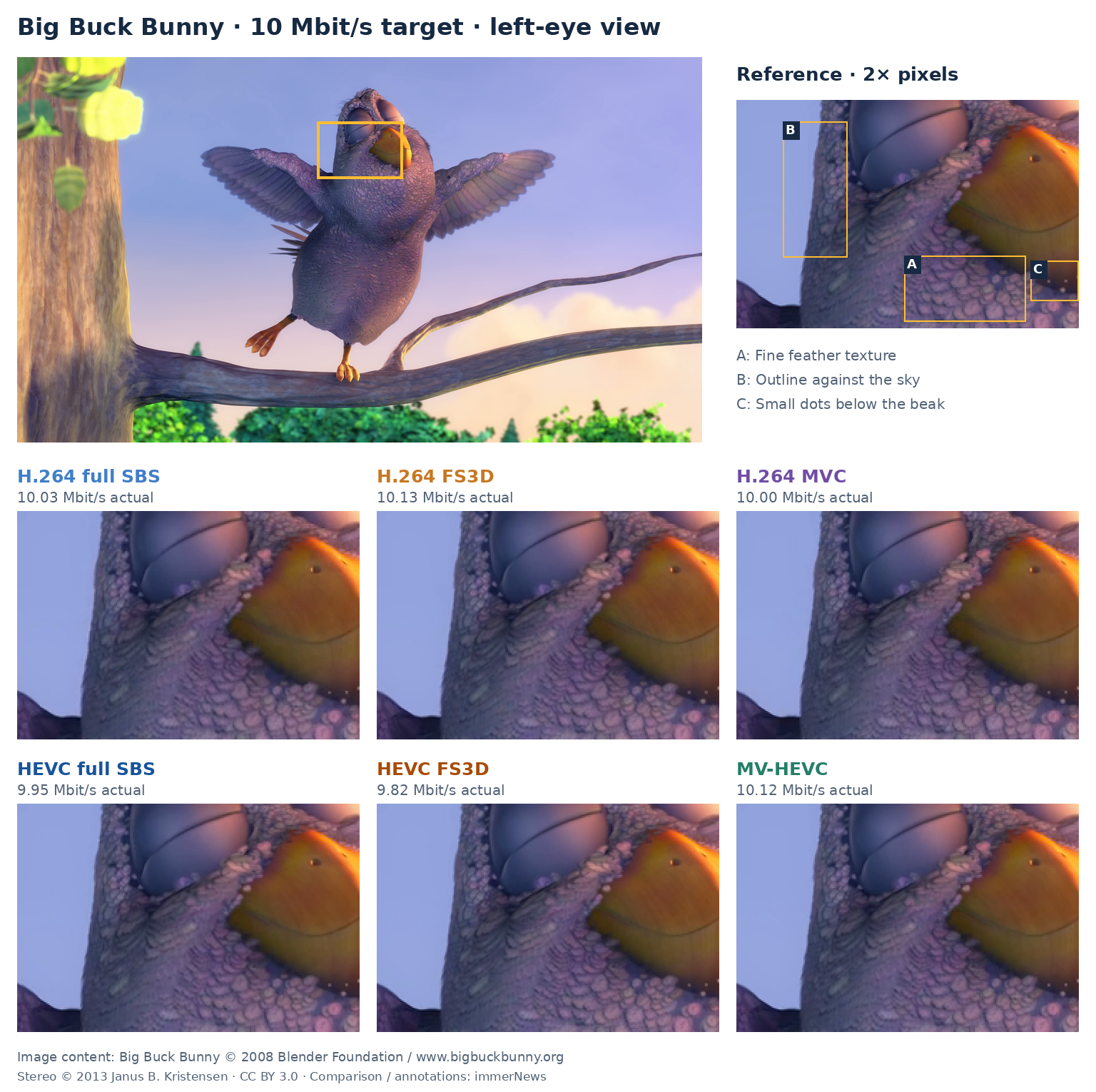
Besides the numerical values from our metrics, it is also interesting to compare the compressed results subjectively. For this visual comparison, we select the left-eye view. The numerical scores continue to include both eye views. We compare the lower 3 Mbit/s target and the higher 10 Mbit/s target. As the bitrate produced by the encoder can differ slightly from the target bitrate, we also show the actual value above the images.
The comparison images first show the reference image as an overview, followed by a detailed crop using 2× nearest-neighbor enlargement and no sharpening. In the reference crop, we marked three areas to compare:
- Feather texture
- Outline against the sky
- Small dots below the beak
To compare the details yourself, click either comparison image, or use its full-size PNG link below. If the browser scales the opened image to fit the window, enlarge it to its actual size, or save the PNG and view it at 100% in an image viewer.
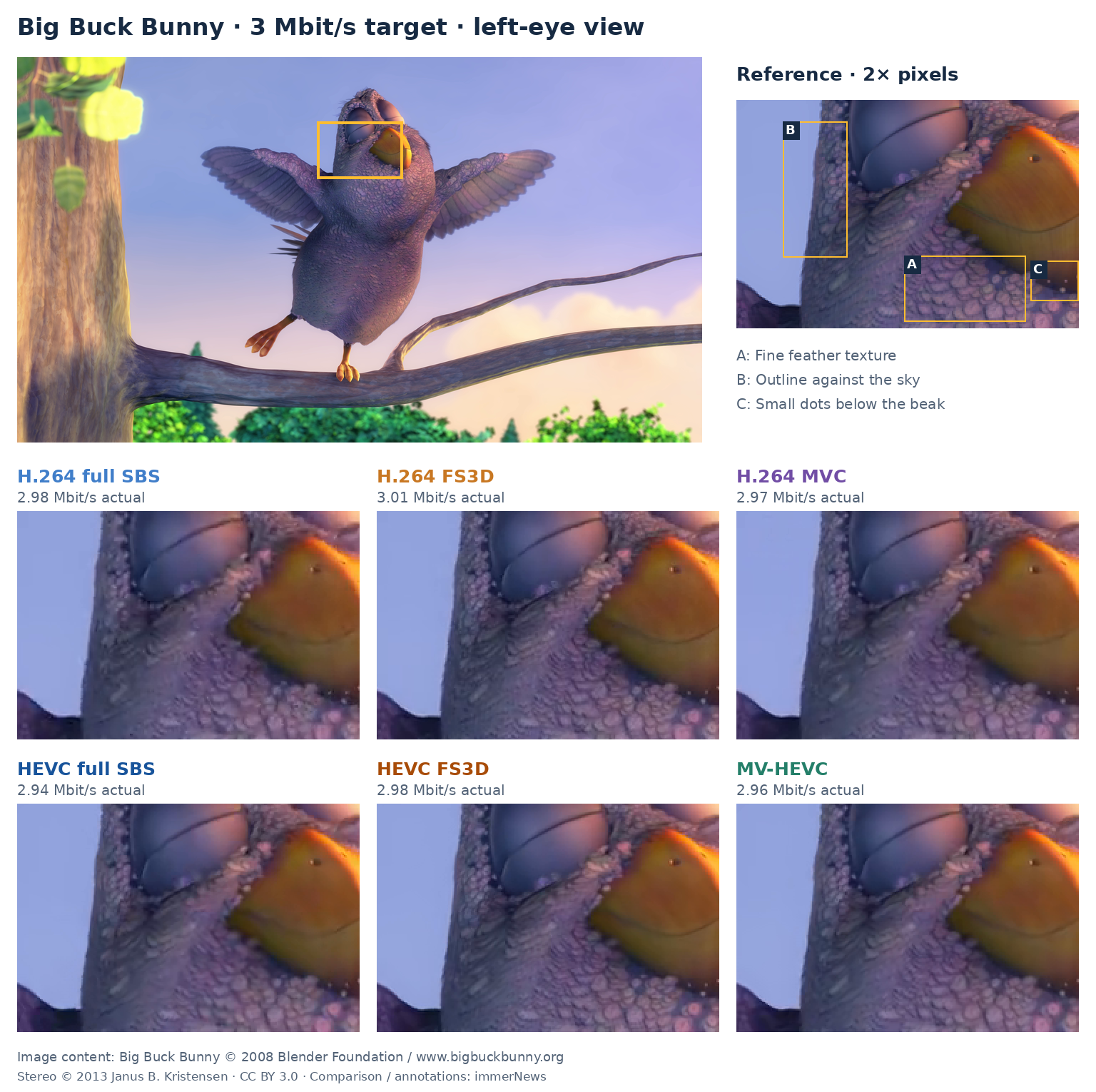
- A. Feather texture: In the reference image, we can clearly see the small rounded feather shapes and the dark gaps outlining them. In the close-up of the H.264 full SBS version, some of this pattern is merged into soft patches. In comparison, H.264 FS3D keeps more of the fine separation between the rounded feather shapes. For H.264 MVC, we also notice fine detail getting lost in that area. In the H.265 examples, it is again FS3D that retains more of the fine feather pattern compared with full SBS. To our eyes, MV-HEVC looks better here than H.265 full SBS, but still not as detailed as H.265 FS3D.
- B. Outline against the sky: Looking at the silhouette against the sky, we see a little more fringing in variants such as H.264 full SBS and H.264 MVC than in H.265 FS3D. However, the difference is subtle, especially when comparing the H.265 versions.
- C. Small dots below the beak: In the H.264 full SBS variant, the shapes of the small dots are distorted and darker patches appear around them. The other versions preserve them more cleanly, with H.265 FS3D showing particularly clear detail here.
Next, we take a closer look at the 10 Mbit/s image quality. Revisiting A and C, we found that the feather boundaries and dots are much better preserved across all six versions, and a clear winner is hard to determine by visual inspection alone. At these bitrates, the previously discussed metrics help quantify the remaining differences, even when those differences are difficult to see.
Checking the result on 3D Blu-ray material
Next, we take a look at two 3D Blu-rays:
- Edge of Tomorrow: A 113-minute film released in 2014 by Warner Bros., with a 3D version. The average combined video bitrate in our disc backup is about 27 Mbit/s.
- Terminator Genisys: A 126-minute film released in 2015 by Paramount / Skydance, with a 3D version. The average combined video bitrate in our disc backup is about 34 Mbit/s.
The Edge of Tomorrow plots below use the same seven bitrate targets for all six workflows. Markers show actual measurements; the lines between them are visual guides. Using PSNR, the 3, 5, 8 and 10 Mbit/s targets share this order, with the highest-scoring workflow first:
- Usually highest-scoring in our Edge of Tomorrow test: H.265 FS3D
- H.265 MV-HEVC
- H.265 full SBS
- H.264 FS3D
- H.264 MVC
- H.264 full SBS
An interesting observation is that at the 8 and 10 Mbit/s targets, H.264 FS3D already scores above H.265 full SBS in SSIM, while H.265 full SBS still has higher PSNR. SSIM was designed to reflect aspects of human vision more closely, so it gives us a useful second perspective. However, neither metric alone establishes which version looks better during playback.
At the very low bitrate target of 1 Mbit/s, MV-HEVC and H.265 FS3D are almost tied, while H.264 MVC clearly scores lowest. At the higher tested bitrates, H.265 FS3D leads both metrics. At the 20 Mbit/s target, H.265 FS3D gains 1.8 dB in PSNR over H.265 full SBS; the corresponding gain for H.264 FS3D over H.264 full SBS is 2.1 dB. As we mentioned earlier, a 3 dB increase means approximately half the mean squared error.
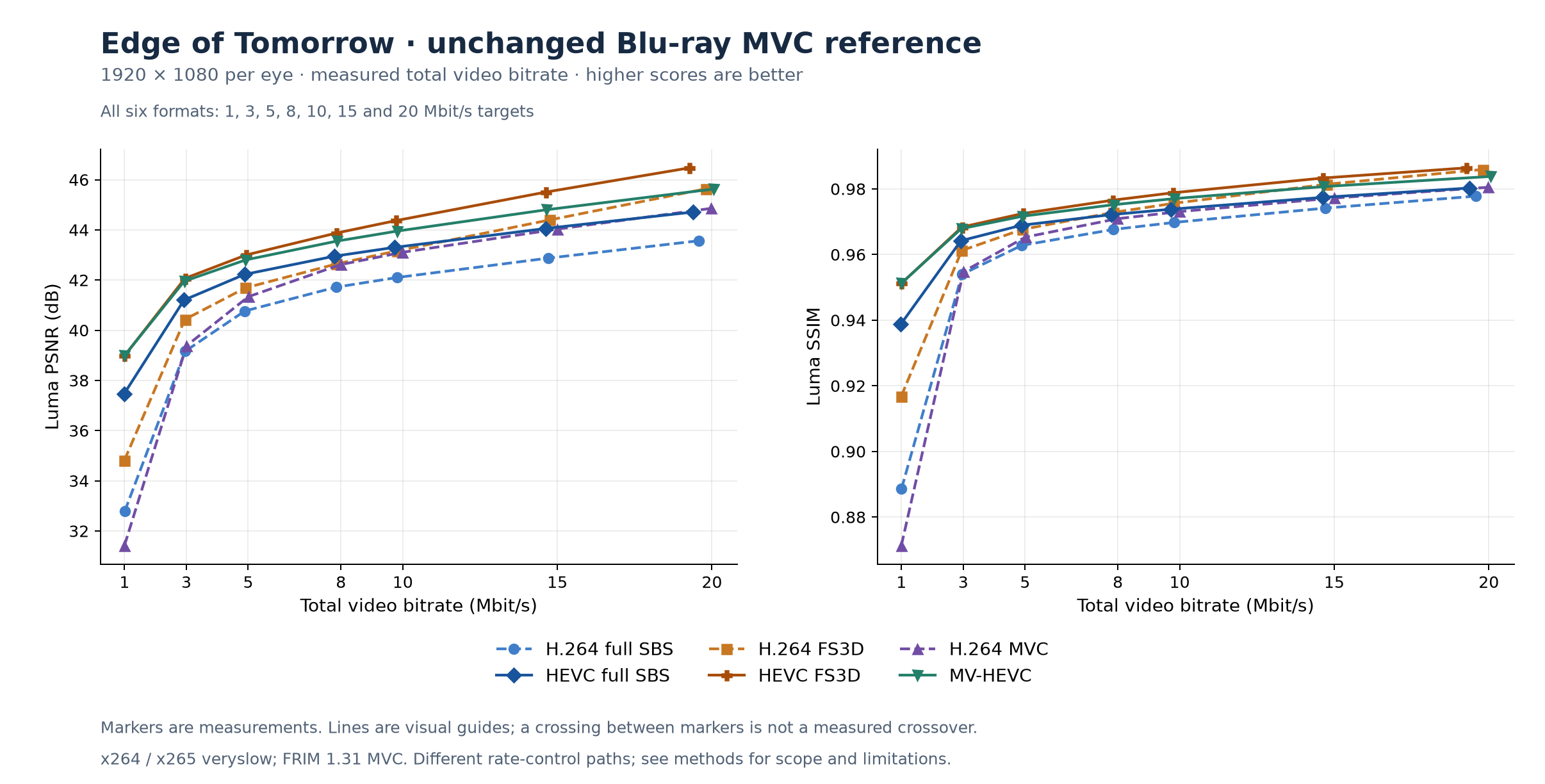
H.265 FS3D leads both metrics at the 3 through 20 Mbit/s targets; at 1 Mbit/s it is almost tied with MV-HEVC.
Source MKV excerpt starts: 00:37:31.499, 00:58:20.998, 01:20:01.797. Each excerpt contains 144 stereo pairs (6.006 seconds). Other editions may have different offsets.
Here, we show the specific values for Edge of Tomorrow at the 5 Mbit/s target. H.265 FS3D performs best on both metrics, PSNR and SSIM:
| Workflow | Actual Mbit/s | PSNR-Y (dB) | SSIM-Y |
|---|---|---|---|
| H.264 full SBS | 4.89 | 40.8 | 0.9628 |
| H.264 FS3D | 4.91 | 41.7 | 0.9676 |
| H.264 MVC | 5.01 | 41.3 | 0.9653 |
| H.265 full SBS | 4.88 | 42.2 | 0.9689 |
| H.265 FS3D | 4.93 | 43.0 | 0.9725 |
| H.265 MV-HEVC | 4.92 | 42.8 | 0.9717 |
As different movies can have very different scenery, we repeated these tests on our second Blu-ray 3D movie, Terminator Genisys. At the 3 and 5 Mbit/s targets, PSNR and SSIM give the following order, treating H.265 FS3D and MV-HEVC as a near tie at the top:
- Usually highest-scoring in our Terminator tests: H.265 FS3D and H.265 MV-HEVC (almost identical)
- H.265 full SBS
- H.264 FS3D
- H.264 MVC
- H.264 full SBS
The order changes at other targets. At 1 Mbit/s, MVC falls below H.264 full SBS. At 8, 10 and 15 Mbit/s, H.264 MVC leads H.264 FS3D in both metrics. At 20 Mbit/s, MVC still has higher PSNR, but H.264 FS3D has higher SSIM than both MVC and H.265 full SBS. MV-HEVC’s small PSNR lead over H.265 FS3D at 10, 15 and 20 Mbit/s also comes with slightly higher actual bitrates.
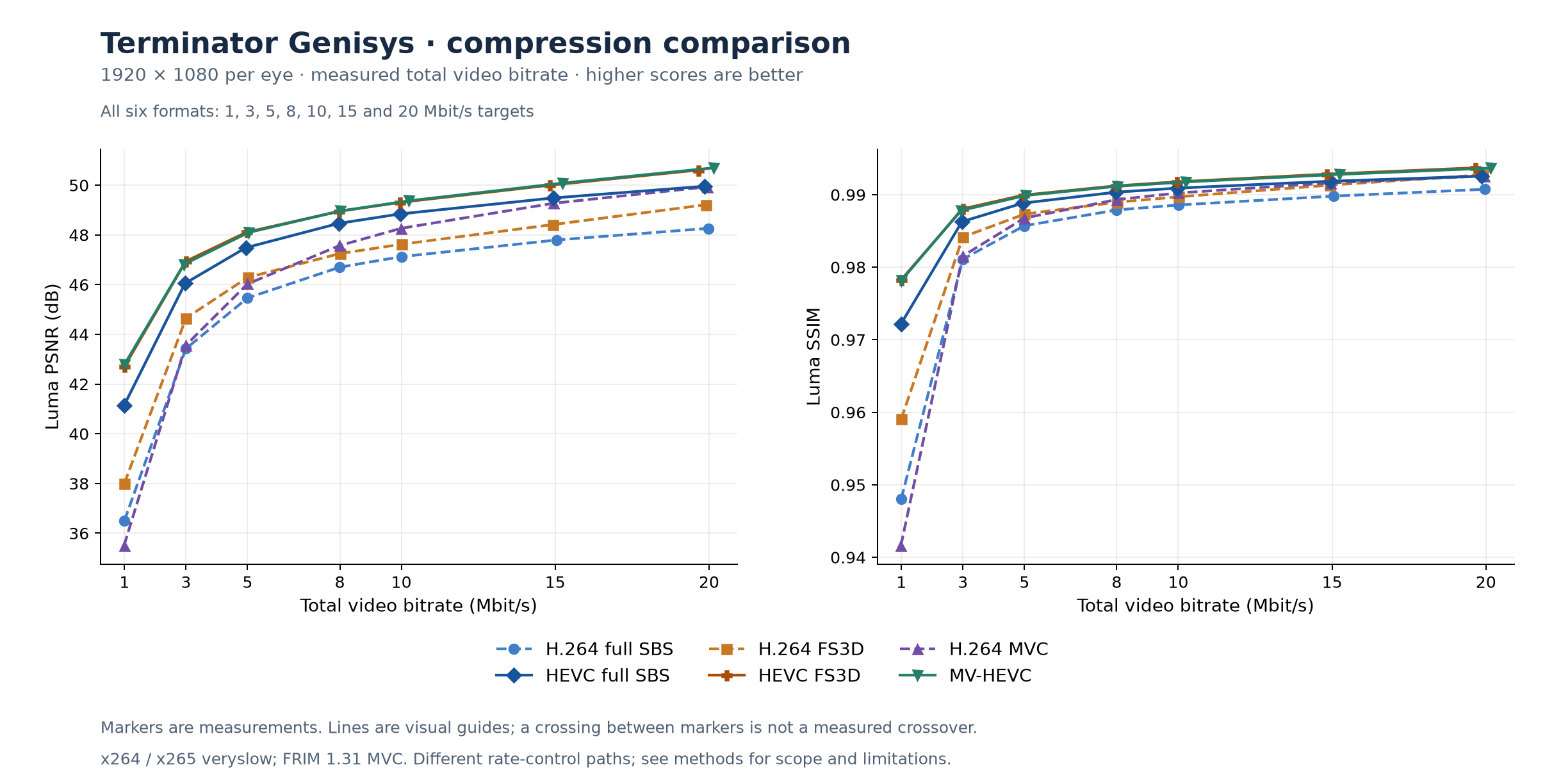
Source MKV excerpt starts: 01:00:01.556, 01:15:00.997, 01:40:00.995. Each excerpt contains 144 stereo pairs (6.006 seconds). Other editions may have different offsets.
Playback compatibility and video hardware decoding
To choose the best approach for storing stereoscopic videos, we have to consider two playback requirements: decoding support, in software or hardware, and correct presentation of the decoded stereo views. For example, a VR media player needs to recognize FS3D and pair the eye pictures correctly to show a 3D video.
We ran our own playback tests in our current build of the VR media player app immerGallery, which we develop. With version 1.4.7 (25 November 2026), immerGallery adds support for H.264 FS3D and H.265 FS3D. We successfully played back H.264 FS3D and H.265 FS3D on Meta Quest 3 and on Windows 11 with an NVIDIA GeForce RTX 3090. Both codecs used video hardware decoding in our app. Our implementation detects FS3D metadata, determines the left/right eye order and pairs the decoded eye pictures for stereoscopic rendering on both platforms.
On PICO 4, we also confirmed correct 3D playback and seeking in the full app. A separate probe using our current native libraries found that both H.264 FS3D and H.265 FS3D fell back to software decoding on the tested Android 10 firmware. The hardware decoders were available, but our current stereo output path could not use them due to relying on a newer API call that is not present in Android 10. A future update from our side might work around this. On PICO 4 Ultra with Android 14, we verified hardware decoding for both H.264 FS3D and H.265 FS3D.
For Steam Frame standalone, our Android build runs through Valve’s Lepton compatibility layer, as described in our article about Steam Frame standalone vs. Quest 3 for immersive media. In the setup we tested, Lepton does not expose video hardware decoders to our app, so H.264/H.265 playback uses software decoding for both full SBS and FS3D. In our full-app tests, both H.264 FS3D and H.265 FS3D showed smooth 1080p stereo playback. We have confirmed that Valve is aware of the hardware decoders not being usable in the current Lepton versions. If Lepton exposes compatible H.264/H.265 hardware decoders in the future, we would expect FS3D to benefit too, with our player handling eye pairing.
While we usually focus on VR at immerNews, there is also H.264 FS3D playback on LG 3D TVs via USB or DLNA. For a documented model example, LG’s manual for the 55LA9659 lists manually selected frame-sequential playback from USB/DLNA for progressive video at 50 or 60 pictures per second. We have not verified a TV model supporting H.265 FS3D. Side-by-side is widely supported on 3D TVs, but support for half SBS does not automatically establish support for 3840 × 1080 full SBS or support for both H.264 and H.265 codecs.
The table below shows whether full SBS, FS3D and MV-HEVC use hardware or software decoding in our VR media player app immerGallery on various VR platforms. Confirmed results and expectations are marked separately.
| Device / platform | Full SBS hardware decoding H.264 / H.265 | FS3D hardware decoding in immerGallery H.264 / H.265 | MV-HEVC hardware decoding H.265 |
|---|---|---|---|
| Meta Quest 3 | Yes | Yes | Yes |
| PICO 4 Ultra | Yes | Yes | Yes |
| Meta Quest 2 | Yes | Yes | No |
| PICO 4 | Yes | No in the current build | No |
| Windows / SteamVR RTX 3090 PC | Yes | Yes | No, but possibly for NVIDIA later |
| Steam Frame standalone Android / Lepton | No (because of Lepton) | No (because of Lepton) | No |
| Meta VR Glasses | Expected; unconfirmed | Expected; unconfirmed | Likely; unconfirmed |
| PICO Space Pro | Expected; unconfirmed | Expected; unconfirmed | Likely; unconfirmed |
Full SBS uses an ordinary H.264 or H.265 decoder, so hardware decoding is normally available on the supported headsets and PCs above. It is not guaranteed for every file: the combined width, frame rate, codec profile and bit depth must fit the decoder’s limits. FS3D uses the same ordinary codec hardware, but doubles the picture rate and also needs the player’s eye-pairing implementation.
Tools, commands and encoding settings for your own tests
In this section, we list the tool versions, commands and encoding settings we used. This is relevant if you want to do your own tests; otherwise, you can skip this section.
Measurements were made from 1 to 18 November 2026. All encoders received the same 1920 × 1080-per-eye, limited-range BT.709, 8-bit YUV 4:2:0 pictures, without audio. BBB: 360 pairs at 30 pairs/s; each film: 432 pairs at 24000/1001. The three selections per source were concatenated before encoding. Tests cover 8-bit SDR, not 10-bit H.265.
Encoders: x264 0.165.x, commit 0480cb05fa18; x265 commit 0807b60bccc5 (8-bit, ENABLE_MULTIVIEW=ON); GCC 13.3. Ordinary SBS/FS3D used two-pass ABR, --preset veryslow --slow-firstpass --ref 4 --bframes 8 --min-keyint 1, closed GOPs, and --frame-packing 3 for SBS or 5 for FS3D. GOP limits: film 48/96 pictures for SBS/FS3D, BBB 60/120; lookahead 60/120. x264 used eight threads; x265 used --pools 6 --frame-threads 2 --no-open-gop. Default perceptual tools remained enabled, without PSNR/SSIM tuning.
Multiview: FRIM 1.31 with Intel Media SDK software runtime 1.28 encoded MVC using VBR, -sw -u 1 -rf 4 -RDO on -Trellis IPB -Bpyramid on -gop 48 3 0 C (GOP 60 for BBB; six slices). MV-HEVC used the same x265 build with --num-views 2 --format 0, separate eye inputs and the above veryslow settings. Its two-pass pilot failed with a CU-tree frame-type mismatch. MVC and MV-HEVC therefore used single-pass rate calibration over up to four attempts, retaining the closest combined bitrate, aiming within 2.5%. All new multiview encodes used a left base eye.
Scoring: FFmpeg 6.1.1-3ubuntu5 handled preparation, H.264 decoding and metrics; FFmpeg 8.1.2 decoded H.265/MV-HEVC; FRIMDecode 1.31 decoded MVC. Custom edge264 film references matched FRIMDecode in both eyes of all six excerpts. Bitrate = elementary-stream bytes × 8 ÷ duration. PSNR-Y pools luma MSE across both eyes before 10 log10(255² / MSE); SSIM-Y averages per-picture luma scores. Only metric inputs exclude bars: Edge crop=1920:800:0:140, Terminator crop=1920:804:0:138. Encodes retain the full raster. Concurrent runs on a Ryzen 9 5950X do not constitute a speed benchmark.
Converting your own MVC Blu-ray MKV: stock FFmpeg 9 does not decode both MVC eyes. A packing flag cannot restore the missing view. A practical Windows route is BD3D2MK3D with 64-bit AviSynth+ to prepare the two-eye input, then FFmpeg to encode it. This avoids a lossy SBS intermediate.
What the tools do: BD3D2MK3D is the Windows interface that opens the Blu-ray MKV, separates its video streams and prepares a conversion script. AviSynth+ runs that script and supplies decoded frames directly to the encoder, without saving a large intermediate video. MVCSource is an MVC decoder plugin for AviSynth+; it reconstructs both stereo views and can return them as alternating pictures. BD3D2MK3D bundles it as one of its decoder choices; our command checks used MVCSource 0.13.0.
- Open the AVC+MVC MKV in BD3D2MK3D 1.40 (with 64-bit AviSynth+ installed). Select Frame Sequential, keep 1080p, leave the 30/60 fps conversion off, and allow automatic encoder level selection. Check the source eye order. Deselect audio/subtitles for these video-only examples.
- Generate the project and finish demuxing, with automatic encoding disabled. Its
__ENCODE_3D_MOVIE.avsscript supplies alternating left/right pictures at twice the pair rate. Placeffmpeg.exein that project folder and open Windows Command Prompt there. - Use a recent FFmpeg build with the new x265 frame-packing support. These commands were checked on a short MVC-derived input with the 11 November Windows GPL build from the 9.0 branch (
n9.0.2-49-gc179411bbb, x2654.3+73-5143a2a0). The stable FFmpeg 9.1 release or newer can now be used too; we verified Gyan’s Windows x64 9.1 package with x2654.3+107-0aa41217for FS3D encoding. Gyan’s September 9.0.2 build and BD3D2MK3D 1.40’s bundled x265 lack the option. The input test used AviSynth+ 3.7.3 and MVCSource 0.13.0. A successful exit alone does not prove that stereo metadata was written.
H.264 FS3D:
ffmpeg.exe -n -i "__ENCODE_3D_MOVIE.avs" -map 0:v:0 -an -sn -dn -fps_mode passthrough -c:v libx264 -preset slow -crf 18 -pix_fmt yuv420p -vf "setsar=1,setparams=range=limited:color_primaries=bt709:color_trc=bt709:colorspace=bt709" -x264-params "frame-packing=5:ref=4:bframes=8:keyint=96:min-keyint=1:rc-lookahead=120" "movie_H264_FS3D.mkv"H.265 FS3D:
ffmpeg.exe -n -i "__ENCODE_3D_MOVIE.avs" -map 0:v:0 -an -sn -dn -fps_mode passthrough -c:v libx265 -preset slow -crf 18 -pix_fmt yuv420p -vf "setsar=1,setparams=range=limited:color_primaries=bt709:color_trc=bt709:colorspace=bt709" -x265-params "frame-packing=5:ref=4:bframes=8:keyint=96:min-keyint=1:rc-lookahead=120:open-gop=0" "movie_H265_FS3D.mkv"Both commands write an MKV in the current folder. frame-packing=5 signals the prepared eye order; it does not rearrange pictures. They assume an SDR BT.709 1080p, 24000/1001-pair/s film; the prepared script supplies 48000/1001 eye pictures/s, so no extra frame-rate doubling is needed. GOP 96 is about two seconds here; use 120 for 30-pair/s input. slow and CRF 18 are reader starting points, separate from the bitrate-controlled benchmark; identical CRF values do not promise equal quality or size across codecs. -n protects existing outputs. For H.264, BD3D2MK3D can also run x264 and mux the result itself. Verify a short excerpt in the intended player before encoding a whole film.
Outlook: AV1, VP9, NVIDIA MV-HEVC and AV2
While H.264 and the newer H.265 are very commonly used codecs, the question is whether frame-sequential compression for 3D could also be used with other common and future video codecs. We also look in more detail at MV-HEVC hardware encoding and decoding support.
YouTube heavily uses VP9 and AV1 for its video compression. In principle, a regular encoder can compress alternating left/right pictures in either codec. However, we are not aware of an established, optimized FS3D workflow with reliable player support for either codec.
We also take a closer look at MV-HEVC encoding and decoding support on Windows:
- Software encoding is possible with a multiview-enabled x265 build, as used in our tests, but can be slower than hardware encoding.
- For NVIDIA graphics cards, Video Codec SDK 13.0 introduced MV-HEVC hardware encoding. The FFmpeg developers identify Turing or newer with seventh-generation NVENC or later as the requirement. This includes GeForce RTX 20-, 30-, 40- and 50-series GPUs, with compatible drivers and software that uses the feature. The application should query the encoder capability; this encoder was not part of our measurements.
- Video Codec SDK 13.1 explicitly describes improvements to MV-HEVC decoding on NVIDIA graphics cards, including information identifying the views and support for third-party bitstreams. Its general GPU requirements include the GeForce generations mentioned above, but the public GPU matrix does not list MV-HEVC decoding separately for each card.
- AMD and Intel: as of November 2026, we have not found a publicly documented two-view MV-HEVC hardware decoding path for AMD Radeon GPUs, Intel integrated graphics or Intel Arc graphics cards.
The specification of the AV2 codec was finalized in May 2026. It includes explicit left/right view labels and information about layer dependencies. A layer can carry an eye view; a dependency tells the decoder that reconstructing that layer requires pictures from another layer. For example, one eye view could use the other as a reference, so the decoder needs to know which layers must be decoded together. That looks promising for stereo video, although we have not tested an AV2 encoding or playback workflow. We will keep an eye on the topic of AV2 and 3D movies.
As for future hardware, Allegro DVT, a supplier of video IP, advertises AV2 hardware decoding in its Pulsar D400 decoder IP, including multiview and AR/VR applications. This is intended for chip designers to integrate into future hardware.
Conclusion: Is the extra effort of encoding to FS3D worth it?
In this article, we have seen that FS3D can deliver very good compression for stereoscopic content in many cases. Where playback support allows, our results favor H.265 over H.264. Many standalone headsets released since 2020, including Meta Quest 2, support H.265 hardware decoding. One reason to keep using H.264 FS3D is compatibility with older playback devices, including some LG 3D TVs as mentioned above.
Specifically, within the same codec, FS3D scored higher than full SBS in both pooled metrics, PSNR and SSIM, at every bitrate target we tested. Individual scenes occasionally favored SBS, as shown in the Big Buck Bunny example. The pooled advantage continued from very low to higher bitrates, although a numerical gain does not always mean a visible improvement.
If storage size is not a concern and the original video is stored in H.264 MVC, as in a Blu-ray 3D backup, it can of course stay in that format. However, some headsets have limited onboard storage. For example, the upcoming Meta VR Glasses are reported to have 128 GB of built-in storage, so a smaller version with very good quality might be preferable. Even with microSD expansion, file size can make a significant difference to how many movies fit onto a single card. The same applies to Steam Frame with its microSD card support, which we described recently, and to USB sticks used for media playback on VR headsets.
For broad sharing and editing, full SBS might still be preferable. It is more widely supported, even if image quality can be lower than FS3D at the same target bitrate within the same codec.
MV-HEVC could be used as well. However, the tool setup can be more involved, and editing and hardware-decoded playback are still relatively limited when considering which devices are actively used. For example, the monthly Steam Hardware & Software Survey lists about 22.2% Meta Quest 2, 4.5% PICO 4 and 1.6% Meta Quest Pro for October 2026. Together, these account for about 28% of the VR headset share in the survey, and all three headsets lack MV-HEVC hardware decoding. Software decoding is still possible, but might not sustain smooth frame rates on these devices.
When comparing FS3D with MV-HEVC, the wider availability of video hardware decoding makes FS3D our preferred choice on today’s hardware, provided the VR media player recognizes it and handles eye pairing.
Every additional lossy encode can reduce image quality, and switching formats cannot restore detail already lost. It therefore makes sense to start from the highest-quality source available, rather than re-encode a low- or medium-quality collection at the same bitrate just to change the storage layout. In practical terms: if your full SBS movie is stored at 2 Mbit/s, converting it to FS3D at the same bitrate is unlikely to help. However, if you have a full SBS movie at 10 Mbit/s and want a smaller version at 2 Mbit/s, choosing FS3D instead of full SBS for that new encode might be beneficial.
The table below gives a quick overview of use cases and potentially suitable codecs and storage layouts.
| Use case | Practical starting point |
|---|---|
| Original Blu-ray copy; size is acceptable | Keep H.264 MVC |
| Sharing with SBS-capable players | H.265 full SBS; H.264 when needed |
| Need to use H.264, FS3D playback confirmed | H.264 FS3D |
| Can use H.265, FS3D playback confirmed | H.265 FS3D |
| Multiview hardware and suitable tools | Compare MV-HEVC with H.265 FS3D in your own tests |
Links
- immerGallery: the VR media player we develop and used for the playback tests.
- Big Buck Bunny: original stereo PNGs; re-render credits; CC BY 3.0. Images are cropped/resized; comparison images are re-encoded.
- Live Die Repeat: Edge of Tomorrow: official Warner Bros. film page.
- Terminator Genisys: official Paramount film page.
- BD3D2MK3D: Windows interface for preparing and converting 3D Blu-ray video.
- AviSynth+: runs video-processing scripts and supplies frames to the encoder. MVCSource: the plugin that decodes both MVC views.
- FFmpeg: 11 November 2026 Windows GPL build: the tested Windows x64, GPL static build from the 9.0 branch,
n9.0.2-49-gc179411bbb, with x2654.3+73-5143a2a0and frame-packing support. Other FFmpeg downloads. - x265 multiview documentation: encoder options for MV-HEVC.
- FFmpeg PSNR and SSIM: documentation for the quality-measurement filters.
- FRIM author thread: documentation and discussion of MVC encoding and decoding.
- FS3D playback discussion; LG 55LA9659 owner’s manual, section B-7 (PDF): documented USB/DLNA frame-sequential mode at 50/60 pictures/s (no mention of H.265 FS3D).
- AV1 specification and WebM container guidelines: codec metadata and documented stereo layouts.
- NVIDIA MV-HEVC encoding requirements: FFmpeg developer discussion; NVENC capability checks; SDK 13.1 playback updates; SDK 13.1 system requirements; NVIDIA GPU matrix: distinguishes encoder and decoder capabilities, but does not list MV-HEVC decoding separately.
- AMD AMF decoder documentation; Intel media-driver capabilities; Intel VPL codec profiles: public API references reviewed for the AMD/Intel MV-HEVC outlook.
- AV2 specification, version 1.0.0: view labels and layer configuration. Allegro DVT Pulsar D400: AV2 hardware decoder IP.
- Further reading: Pulipaka et al. (2013): found MVC ahead of frame-sequential encoding in their tests, but compared against half-width SBS. Different sources and encoders prevent a direct comparison with our full-SBS results.
- Further reading: Guruvareddiar and Joseph (2015): reported temporal interleaving ahead of spatial packing, with MVC ahead of both. The publisher’s simulation excerpt identifies SVC-TS, rather than ordinary x264 FS3D.
- Further reading: 3GPP TR 26.905, section 5.3.4: includes full SBS and temporal interleaving, with an explicit warning that encoder maturity and upscaling affect the results. Historical context, not a fixed saving for modern encodes.